


Getting Shopify accounting right early sets your business up to scale cleanly. Skip it, and you're not just risking messy books. You're risking some very avoidable mistakes that get expensive to unwind later. This guide walks through three accounting methods based on your revenue stage, so you can pick the right one and know exactly how to implement it. Want the five-minute version first? Start with 3 Accounting Basics for Shopify Sellers, then come back here for the full breakdown.
How do I know which Shopify accounting method is right for my business?
An important thing to understand with your Shopify accounting is the trade-off between the amount of detailed financial information you get and the amount of time it takes to get that level of accuracy.
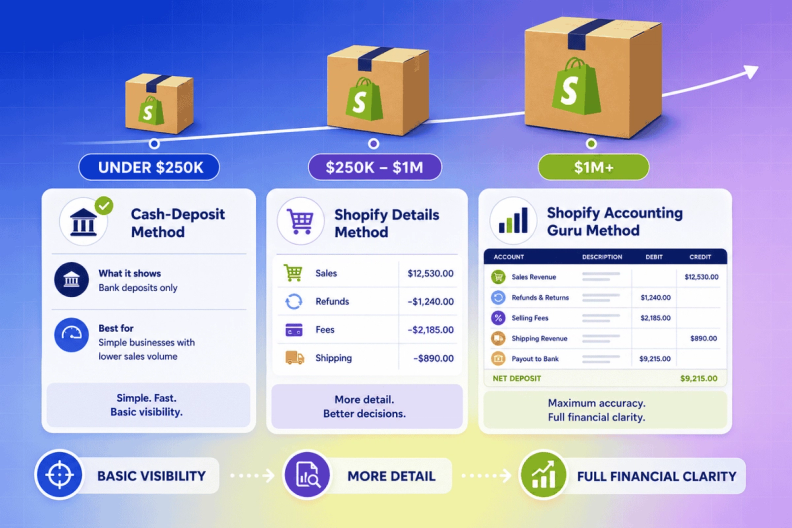
Each method we cover progressively gets more accurate and, therefore, more complex and time-consuming. Depending on the stage and size of your business, there is a time and place for each method. We suggest each method based on the following business sizes:
- Cash-deposit method: Sellers doing less than about $250K in annual sales
- Shopify details method: Sellers doing about $250K to $1M in annual sales
- Shopify accounting guru method: Sellers doing about $1M+ in annual sales
How is Shopify accounting different from other business accounting?
In addition to accounting for transactions in your bank account and credit cards like other typical businesses, Shopify sellers have an added complexity of accounting because a lot of financial activity occurs in your Shopify channel and your payment processors.
You can think of the activity in three levels (see diagram below). These levels include:
- Your sales channels
- Your payment processors
- Your bank account.
Each level has financial data flowing through it.
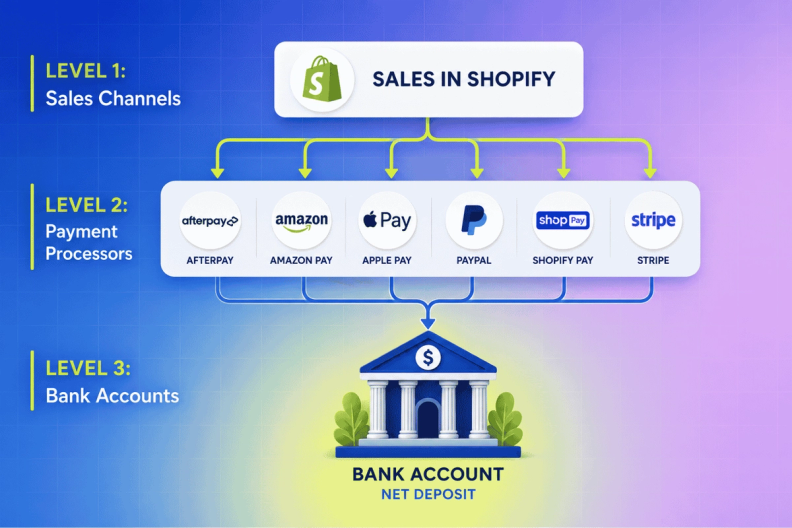
Therefore, the Shopify deposit you see in your bank account is a NET deposit of all the activity happening on Shopify and your payment processors. Activities included in this net deposit are:
- Sales
- Chargebacks
- Refunds
- Shipping
- Sales tax
- Merchant fees
- and more
It’s more than just sales.
So, if you simply record the Shopify deposit you see in the bank account as sales, you are misstating revenue and missing other activity going on.
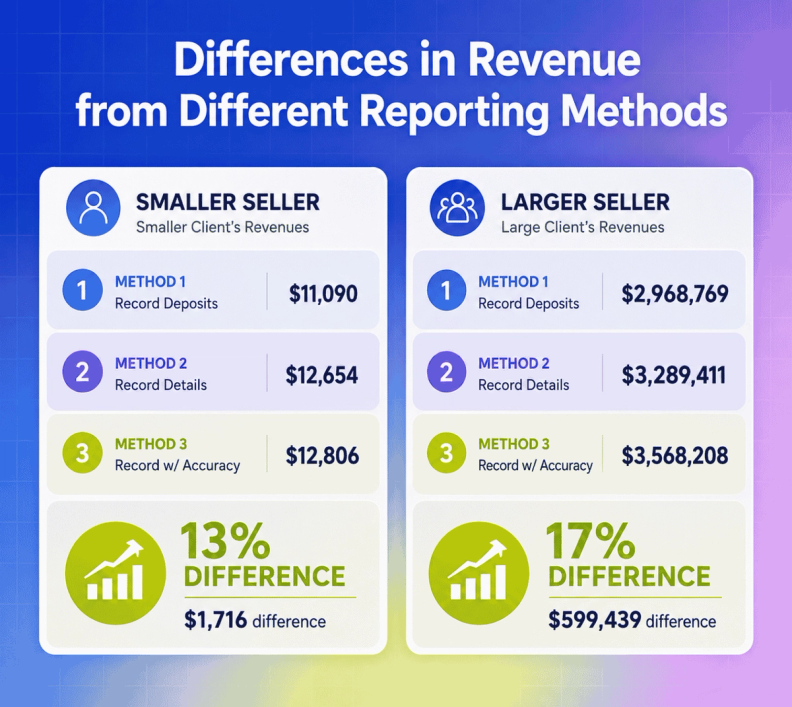
The larger the business, the larger the discrepancy from this misstatement is going to be, which is why bigger companies need to move towards the Shopify accounting guru method. They will get more detailed info about what is happening at the channel and payment processor levels, so they can make decisions that will increase profits.
Here are examples of two clients (one smaller, one bigger) and how much they would be misstating revenue by just recording the Shopify deposit in their bank account (Method 1: record deposits) vs getting accurate “sales” numbers through the Shopify accounting guru method (Method 3: record w/ accuracy):
Importance of accurate accounting for Shopify ecommerce stores
Without accurate accounting and bookkeeping practices, you have no idea how successful your Shopify store actually is. In addition to recording sales, you need to keep track of all financial transactions, including fees, taxes paid, refunds, shipping costs, and more.
Here are some benefits of detailed Shopify accounting:
Financial forecasting made easier
The only way to move forward with your business is to know where you currently stand financially. Having accurate bookkeeping and accounting allows you to make informed decisions regarding growth. You’ll have the data necessary to determine when it’s a good time to introduce new products, have a sale, or start selling on multiple channels.
Sales tax compliance
Keeping good books means you’re following sales tax regulations for your ecommerce business. You can set up Shopify to calculate sales taxes, so paying attention to your accounting helps you understand when to remit to maintain tax compliance.
How to do accounting for Shopify businesses: 3 methods
The methods below are focusing on different ways to record all the activity in Shopify and your payment processors.
Remember that you will likely still have other financial transactions through your bank account and credit cards that you’ll need to record (these other transactions are typically much easier to handle).
Also, know that each of these methods will suffice when it comes to getting an accurate net income and the financials needed for tax season. But other big differences are really important to understand!
Also, we’re not going to go into accurate COGS and inventory recording in this blog. That’s a whole other piece of your accounting!
Method 1: Shopify cash-deposit accounting
The first Shopify accounting method is what we call “cash-deposit accounting.”
This method is for smaller sellers who are busy getting their business off the ground and growing.
When you’re just starting out, your marketing and other activities are more important to growing your business right now than dealing with your accounting. You don’t want to spend countless hours figuring out your accounting. Sure, you need to be considering sales and profitability, but you likely don’t need this information in detail yet. And with low sales volumes, you probably have a decent idea of where you are financially.
How to implement Shopify cash-deposit accounting
So, what is cash-deposit accounting?
It means that you will simply be recording the deposits you see in your bank account from Shopify as “sales.” We’ll give you an example of how to do this in QuickBooks Online.
- Click on “Banking” tab (get help setting up your bank feeds).
- Select the bank where your Shopify deposits are going.
- Click on “Spent” column to flip the transactions to show all “Received” transactions at the top.
- For all deposits coming from payment processors, categorize them as some sort of “Sales” account that you keep consistent.
- Add class tracking if you have multiple sales channels (find additional info on class tracking here.)
Pros and cons of cash-deposit accounting on Shopify
Pros
- You have a pretty good idea of how your business is performing with a little amount of time spent on bookkeeping and accounting.
- Your financials will be tax appropriate.
Cons
- You will lose detail on product margins and therefore your margins will be skewed.
- Your sales will almost always be understated.
- You may miss out on some liabilities, such as sales tax.
Companies that are this small will likely have little sales tax exposure. But sales tax is something you should be thinking about.
For more information, watch Ecommerce Sales Tax | When Do Sellers Need to Collect?
Method 2: Shopify details accounting
The second Shopify accounting method is a little more detailed.
This method ties out to what you would see on the backend of Shopify and is good for businesses doing $250K to $1M.
Basically, you’ll be focusing on:
- Recording accurate gross sales
- Pulling out sales tax liabilities
- Clumping the rest of the activity into “payment processor fees”
How to implement Shopify details accounting
This requires a journal entry and gets a bit more complicated. Once you figure it out, it really isn’t too bad, though.
Pros and cons of details accounting
Pros
- You’ll have greater detail, and your sales numbers will be more accurate than the previous method.
- It will also help in making sure you are setting aside sales tax liabilities so that you can remit those to the necessary states as you grow.
Cons
- The biggest downsides are that you will have timing issues from month-to-month.
- You are still estimating or making assumptions for “payment processor fees”. Therefore, you are losing some visibility as to what is happening at that level.
- Finally, yes, you must deal with a journal entry (it’s really not that scary though).
Method 3: Shopify accounting guru
The Shopify accounting guru method is highly recommended for sellers with over $1M in annual sales.
At this sales volume, you are really trying to grow a profitable business as you continue to increase demand. You need the financial data that you’ll get in this most advanced method, where timing and transparency are as accurate as you’ll get.
Unlike the previous methods, it requires diving into payment processor data. In addition, you’ll need some Excel skills and/or the implementation of a tool like A2X.
You’ll have a detailed view of what is happening on your sales channel, your payment processors, your bank account, and necessary liabilities will be tracked and separated.
How to implement Shopify accounting guru method
To break down this method completely, it would likely require 3-4 hours of training. Then, many more hours of practicing the method before you’d likely feel comfortable with it.
At this point, we highly recommend outsourcing your accounting to ecommerce accounting experts, so you can you focus on what you do best: running your business.
Pros and cons of the Shopify accounting guru method
Cons
- The Shopify accounting guru method is complex.
- It will require hours of learning and skills in different tools or programs.
Pros
- With that said, the level of financial detail and accuracy you’ll get is what you truly need to grow a profitable, successful Shopify business.
- You’ll have numbers that can drive key business decisions.
Note: this method is not for the faint of heart.
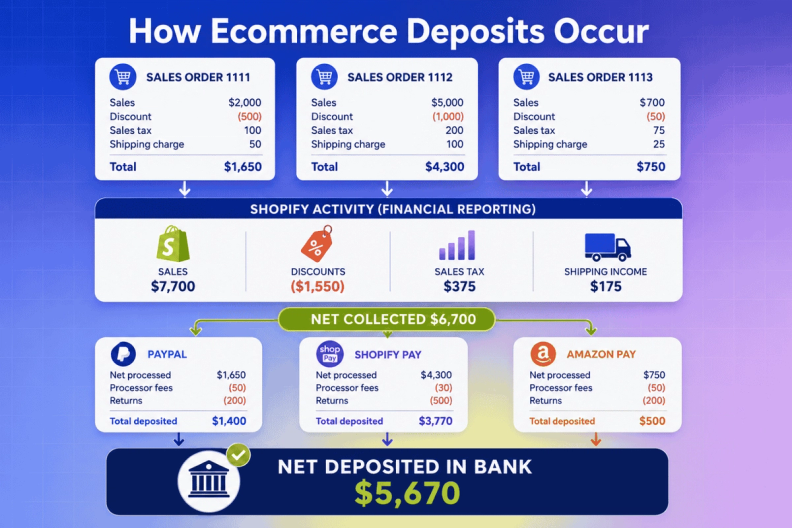
Here’s an example of the information you get as you move through the 3 levels from sales channel to payment processor to the bank:
And here is what the difference between the 3 methods looks like in the end:
Simplify Shopify accounting with cloud accounting software
So, how can you simplify Shopify accounting? Take it to the Cloud! Automating repetitive tasks takes a weight off your shoulders.
Also, cloud-based accounting makes it easier to streamline your books if you sell on multiple channels. Accounting in the cloud offers better scalability, so your bookkeeping practices can keep up with your business’s growth.
Other cloud accounting benefits include:
- Cost effectiveness
- Easy to access
- Easy to use
- Flexibility
- Instant updates automatically
- No upgrades required
- Secure servers protect data
Shopify bookkeeping best practices
What are the best ways to have accurate bookkeeping and accounting for your Shopify store? We recommend, at a minimum, the following accounting practices:
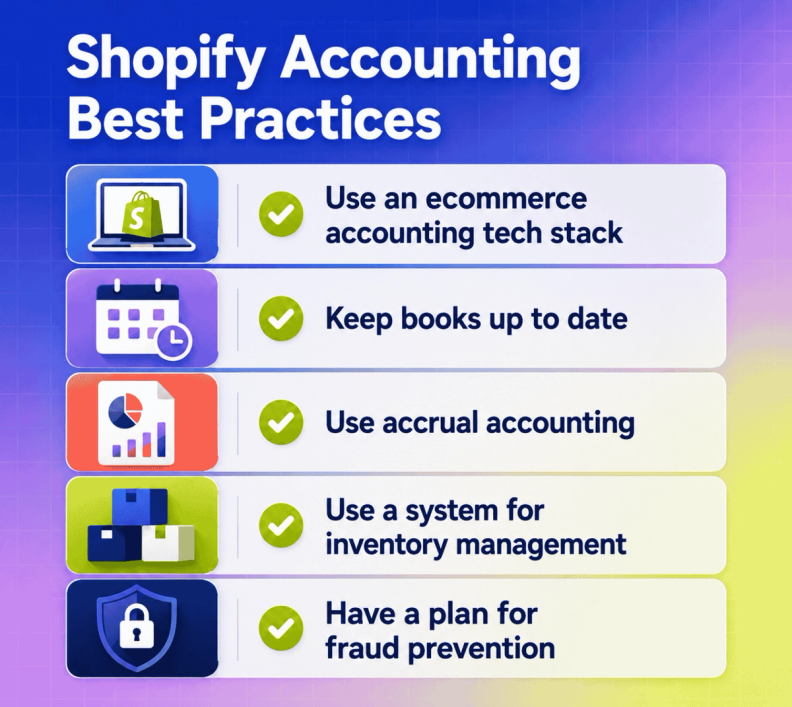
Use an ecommerce accounting tech stack
What’s an accounting tech stack? It’s the practice of pairing software and integrations into your accounting. For example, using QuickBooks Online and A2X is a tech stack. Pairing technologies together can help you create the ultimate method for accurate bookkeeping so your business can flourish and grow.
Keep books up-to-date
We don’t feel like this needs to be said, but here’s your reminder anyway: keep your books up to date!
“Finances are the lifeline of a business. Accounting helps the business owner understand the story of what’s happening.” - Brittany Brown, LedgerGurus CEO
Do you want to know what’s going on with your business? Use tools to keep you informed of your financial data in real time.
Use accrual accounting
What is accrual accounting? Is accrual accounting the right choice for your business? If your business generates $25 million in sales over a three-year period, yes, accrual accounting is the required choice.
For more information: To learn about cash vs. accrual methods of accounting and who should use which practice, read From Cash to Accrual: A Stage-by-Stage Guide as Your Ecommerce Business Grows.
Use a system for inventory management
We’ve said it once and we’ll say it again: INVENTORY IS YOUR LARGEST ASSET!
As such, it’s imperative to have an efficient inventory management system in place for your ecommerce business. We have tips for good inventory management in A Road Map for Good Inventory Management.
Key takeaways:
- Track inventory quantity and quality
- Value inventory using landed cost of goods sold
- Implement internal controls
- Upgrade as needed to accommodate growth
If you are looking for some help in this area, we have a team of inventory management experts who can take a look at your business and see what you need to grow sustainably.
Have a plan for fraud prevention
There are numerous ways to get scammed as a Shopify seller.
Sometimes your items are purchased with stolen credit cards, customers request a return and then send back a different product, or they’ll fake payments via a PayPal “switching scheme.”
It’s also possible that your business is susceptible to embezzlement.
For help with fraud prevention, download 7 Best Practices to Streamline Your Accounts Payable Process from LedgerGurus.
How to create an accounting system for Shopify
Because cash flow isn’t linear in ecommerce businesses, it’s important to know what happens between a purchase transaction and the eventual deposit into your bank account.
To help you set up an accounting system for Shopify, we recommend you download The Essential Ecommerce Bookkeeping checklist from LedgerGurus.
It helps you know what to do, and when, so your accounting is up-to-date and you’re always prepared for tax time. It will walk you through the necessary tasks to create an accounting system for Shopify. The areas it includes are:
- General bookkeeping
- Sales tax
- Ecommerce channel activity
- Inventory
- Payroll
- Accounts receivable
- Accounts payable
- CFO / strategic
Potential problems faced in Shopify accounting
To get started on the right foot with your Shopify accounting, it’s good to be aware of the common Shopify accounting mistakes ecommerce sellers make. We’ve seen it all at LedgerGurus, and have advice for the following potential problems faced in Shopify accounting.
- Miscalculation of inventory and/or cost of goods sold (COGS) value
- Miscalculation of sales tax
- Recording shopify deposits as revenue
- Combining business and personal financial activities
- Little or no accounting
For more information, read 5 Common Shopify Accounting Mistakes.
What does a Shopify bookkeeper do?
An experienced ecommerce bookkeeper should:
- Record all transactions (sales, fees, expenses)
- Reconcile to outside statements
- Track inventory purchases/sales
- File taxes
- Generate financial reports
Our ecommerce accountants have great attention to detail and the experience needed to manage online business books for you.
Frequently asked questions
Does Shopify offer accounting?
Not exactly. Shopify does NOT offer a built-in accounting feature, but it does support integration with accounting software like QuickBooks Online and A2X.
What accounting software connects with Shopify?
Cloud-based accounting software connects seamlessly with Shopify. We like QuickBooks Online because it's robust and easy to work with, especially paired with A2X.
Which bookkeeping software should I use with Shopify?
You can use whatever fits your business, but we recommend QuickBooks Online for most Shopify sellers.
Can I record expenses directly in Shopify?
Yes, you can record sales, expenses, and tax data in Shopify. That said, some sellers find Shopify's expense tracking limited compared to dedicated accounting software, which is one reason we recommend pairing it with a tool like QuickBooks Online.
Does Shopify collect income tax?
No. Shopify can automate charging sales tax, but it doesn't calculate, remit, or file income tax on your behalf, that's a separate obligation you (or your accountant) handle directly.
Does Shopify collect sales tax for me?
It depends on which tool you use. Shopify Tax, Shopify's own engine, calculates sales tax automatically based on product and location, free up to $100,000 in annual sales before fees kick in. Avalara for Shopify is the other option, better suited to sellers with more complex or international sales. Neither one files or remits on your behalf automatically unless you separately enable Shopify's automated filing add-on, which has its own eligibility limits. See our full comparison of Shopify Tax vs. Avalara for Shopify for the details.
What's the difference between the three Shopify accounting methods in this guide?
Cash-deposit accounting (for sellers under $250K) simply records bank deposits as sales, fast but imprecise. Shopify details accounting ($250K-$1M) breaks out the individual components of each deposit for more accuracy. Shopify accounting guru method ($1M+) gets the most granular, tracking sales, fees, and adjustments at the channel and processor level for the cleanest possible numbers.
Do I need an accountant who specializes in Shopify specifically?
Not necessarily at every stage, but the more complex your setup gets (multiple payment processors, multiple sales channels, higher revenue), the more it helps to work with someone who understands Shopify's specific quirks rather than a general bookkeeper.
Get Shopify accounting right for your stage
Shopify accounting isn't a one-click solution, especially with a bookkeeper who doesn't understand the platform's quirks. It takes knowing which method fits your current stage and following through on the details that method requires.
If you'd rather have that expertise on your team already, our ecommerce accountants live in Shopify accounting every day and can take it from here.
