

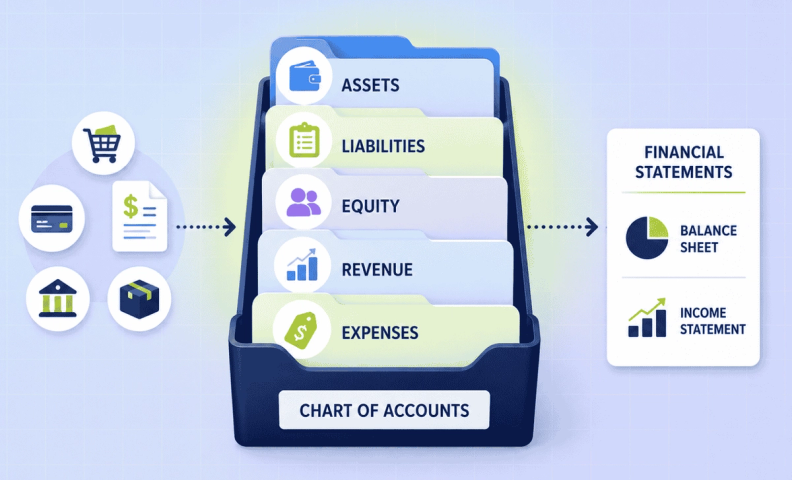
Think of your chart of accounts as the filing system behind every number in your financial statements. Every sale, every expense, every dollar that moves through your business gets sorted into one of five categories, and if that filing system is messy or too generic, your financial statements will be too.
It's one of those unglamorous details that's easy to overlook, but a clean chart of accounts is what lets you actually trust the numbers you're looking at.
What is a chart of accounts (and why it matters)?
A chart of accounts is the financial tool which sorts all your business transactions. It's the foundation of your financial statements. QuickBooks Online (QBO) has a chart of accounts feature which we recommend to any ecommerce business owner. It's easy to use and already synced in to other financials you have within QBO.
Within the chart of accounts, there are five main categories to sort transactions:
- Assets
- Liabilities
- Equity
- Revenue
- Expenses
The first three categories are used to compile the balance sheet and the last two are on the income statement.
How to set up a chart of accounts in QuickBooks Online?
For those new to the chart of accounts, we've put together a chart of accounts template specifically for ecommerce business owners to help you get started right in QuickBooks Online.
Once in QuickBooks Online, you can access the COA by navigating to Accounting, then Chart of Accounts. From there, you will see the full list of accounts and the categories they fall under. For first time users, you will have to answer a set of preliminary questions to set-up a chart of accounts. This will result in the creation of 15-20 accounts based on your answers. We know it's far from adequate, so we recommend you edit the names of these accounts to best fit your systems.
To help you, we created a demo video with a detailed explanation for setting up your chart of accounts in QuickBooks Online.
5 tips for keeping your chart of accounts clean
Once you get your chart of accounts set up in QuickBooks Online and get the hang of how to adjust the details for each account, you can start the fine tuning. This is where we think you'll see the difference building your well-oiled machine makes.
- Keep the information simple. Try to find ways to streamline names on the accounts. Be sure to double check what's already in place before adding a new account.
- On the flip side, make sure you add in enough detail to make the system work for YOU. We suggest that account titles be no more than 3-4 words and sub-account titles are properly aligned. For example, if you have a utilities account for trash, electric, phone, etc. and a separate account for internet service, it's probably best to go ahead and lump that into utilities.
- Don't create an expense account for each transaction. This may seem like a no-brainer but consider the scenario of a business trip. Do you create a new account just for that one-time trip? Or do you place it into an already created account for travel? We'd recommend the latter.
- Be sure to accurately record sales tax as a liability, not income. Another seemingly no-brainer, but trust us, it happens.
- Be sure to accurately calculate your Cost of Goods Sold (COGS) so you have an accurate gross profit margin. Keep in mind that errors here are more common than you'd think, and can lead to bad decisions about spending or pricing.
These are just a few tips for setting up your chart of accounts. For additional advice, watch Amazon Seller Bookkeeping Basics (for Accurate Financials).
Why a clean chart of accounts is worth the effort
Why invest in fine tuning your chart of accounts? It comes down to efficiency. A well-organized COA saves time, saves money, and saves a lot of headaches. It gives you the ability to drill down into your financials and make adjustments with confidence. Get the information right at this foundational level, and you know your financial statements will be accurate, giving you what you need to make informed business decisions.
A chart of accounts that "works" but isn't well-organized will still get you financial statements, but they won't be ones you can fully trust. The difference between a mediocre chart of accounts and a well-tuned one shows up everywhere downstream, in your margins, your cash flow visibility, and your confidence in every number you look at.
Frequently asked questions
What is a chart of accounts, and why does my online business need one?
It's the financial tool that sorts every transaction into assets, liabilities, equity, revenue, and expenses, the foundation your financial statements are built on. Without a well-organized one, you can't trust the numbers those statements show you.
Does QuickBooks Online set up a chart of accounts for me automatically?
Yes, it auto-generates 15-20 starter accounts based on a few setup questions, but that starter list is rarely detailed enough for an online seller's actual needs. Plan to customize it.
How detailed should my account names be?
Keep them simple, ideally 3-4 words, and grouped sensibly. Avoid creating a brand-new account for every one-off transaction, like a single business trip, lump it into an existing category like "Travel" instead.
Should sales tax be recorded as income or a liability?
A liability, always. Recording collected sales tax as income is one of the most common chart of accounts mistakes we see, and it distorts your actual revenue.
How does my chart of accounts affect my gross profit margin?
Your Cost of Goods Sold needs its own accurately maintained account, since an inaccurate COGS number throws off your gross profit margin and can lead to bad decisions about spending or pricing.
How often should I revisit my chart of accounts?
Periodically, especially as your business grows and adds new revenue streams, expense categories, or sales channels. A chart of accounts that fits you at $50K in revenue may not fit at $500K.
Get your chart of accounts set up right
A clean chart of accounts is the foundation everything else in your books builds on. If you'd rather have it set up by people who do this for ecommerce businesses every day, we can help.
