

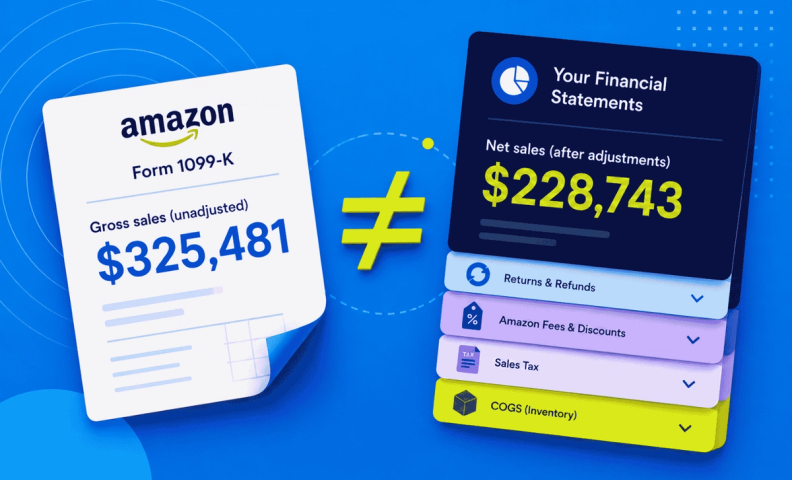
For our Amazon sellers, perhaps this is a familiar scene… It's tax time. You sit down, review your annual Amazon tax statement, and notice one big thing. Your sales figures do not match what you have in your company books. Not even remotely. Panic sets in. You imagine how much bigger your tax bill is going to be now. It's going to eat into funds you earmarked for important stuff. Yikes!!

Have you ever had this moment? Plenty of our clients have. And we know, it's not fun. Reconciling the numbers often isn't easy, and it can be daunting even knowing where to begin. In the end, it's your neck on the line as a business owner. The numbers have to add up, and they have to make sense.
And that's why we're here. To help you make sense of the in's and out's of the numbers. You can also find more details in our video Amazon 1099 vs. Financial Statement Activity.
Amazon 1099: The basics
As an Amazon seller, you likely are somewhat familiar with the Amazon 1099. For the newbies out there, however, let's go over the basics of what it is.
Amazon, and other third party online selling platforms, are required by the IRS to file Form 1099-K for all U.S. taxpayer sellers who meet the following thresholds in a calendar year:
- More than $20,000 in unadjusted gross sales, and
- More than 200 annual transactions.
For Amazon sellers, we refer to Form 1099-K as your Amazon 1099.
Your Amazon 1099 is accessible in your seller account > Amazon Seller Central, via Reports > Tax Document Library > then select appropriate tax year.
You can also expect a copy to be sent to you either by post or email, depending on the instructions you provide to Amazon, by January 31 of the following year.
It's really important to understand that your Amazon 1099 is your documentation for GROSS SALES ONLY, meaning, it does not reflect expenses you may have to carry out for the transaction such as shipping, returns, or discounts, which would provide you with a net figure. This is where other Amazon financial reports can be used to identify the finer details and where your accounting software, like QuickBooks Online, comes in and can break down those figures with a greater level of accounting accuracy.
That said, it's a lot of work to manually transfer data from your Amazon account to QuickBooks. A LOT, like potentially hours of your life. That's why we highly recommend investing in a software program, such as A2X, which automatically integrates the financial data from your Amazon transactions into QuickBooks Online, or other preferred accounting software. You can find additional information in our article Why A2X is an Essential Accounting Tool for Amazon Sellers. We have detailed steps for setting it up in our accompanying tutorial.
Accurate accounting data for the win
Once you have software in place to more accurately see your accounting activities between Amazon and QuickBooks Online, you will have a much better picture of your financial position and can make better business decisions. There are a couple of factors that play into you having very accurate numbers and which are REALLY important to successful accounting:
- Taxes
- The cost of goods sold (COGS)
First of all, we cannot stress enough that sales taxes must be marked as a liability, not income, in your financial reports. While this seems like a no-brainer, for less seasoned business owners, it's an easy rookie mistake that can result in some serious lost moo-lah. Bottom line is: do your due diligence and don't let the IRS think you owe them more money than you really do.
Secondly, your COGS numbers should accurately reflect the cost for each product SKU and should be recorded at the time the sale is made (as opposed to the time it is purchased). An incorrect COGS number will result in an inaccurate taxable income and profit margin–two metrics which are vitally important for making sound business decisions. For more details on how this works, check out our detailed COGS article.
Accuracy really does underlie successful business. It's the difference between guessing and knowing. While a fly-by-the-seat-of-your-pants approach might work for a lot of things in life, it doesn't work for good business. Inaccurate numbers usually cost you money, and we don't want that for you! We explain the accuracy factor in more detail in Accounting for Amazon Sellers.
Recording in QuickBooks to show the real story
As your business grows, you'll want your QuickBooks to show what's really going on so you can rely on it as the source of truth for your financials. Obviously, we've had oodles of experience over the years helping online sellers do just that. The advice we give is typically dependent on the size of their business:
- <$100K/year net income
- $100-$500k/year net income
- >$500k/year net income
For each category, we detail a plan of action in our article How to Record Amazon Sales in Quickbooks Online and even break down the steps one by one in our accompanying tutorial. In general, if you want to grow your business, you'll want a greater level of detail in your QuickBooks reports which means you'll devote more time and resources to develop it.
One tool you'll likely want to set up in QuickBooks once you know how you're recording your financials is a cash flow statement. This financial statement essentially shows the movement of cash within your business. It's an important piece to show if you have the funds to invest in expanding your business.
Frequently asked questions
Why doesn't my Amazon 1099 match my bookkeeping numbers?
Your Amazon 1099-K only reports gross sales. It doesn't account for shipping, returns, discounts, or other expenses, so it will never match the net figures in your financial statements.
Should sales tax be recorded as income in my books?
No. Sales tax should always be recorded as a liability, not income. Marking it as income is a common mistake that can make your business look like it owes more tax than it actually does.
When should COGS be recorded, at purchase or at sale?
At the time of sale, not purchase. COGS should reflect the actual cost of each SKU when it sells, since recording it at purchase will throw off both your taxable income and your profit margin.
How much detail do I actually need in my QuickBooks setup?
It depends on your business size. LedgerGurus generally advises different levels of detail for sellers under $100K, $100K-$500K, and over $500K in annual net income, with more detail recommended as you grow.
At what point should I consider outsourcing my accounting?
If you're operating above $2M/year in net income, outsourcing is worth considering. At that scale, there's enough complexity that a professional can catch hidden risks and growth opportunities you'd likely miss on your own.
Taking the next step
The gap between your Amazon 1099 and your books isn't just a tax-season headache, it's a sign your accounting needs a closer look. LedgerGurus can get your Amazon sales, COGS, and sales tax recorded correctly in QuickBooks, so your numbers actually reflect what's happening in your business and your tax filings hold up under scrutiny.
