

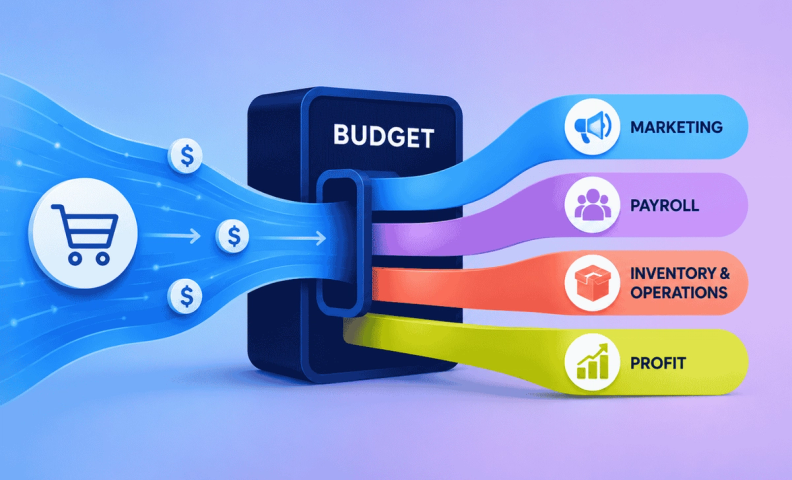
What if the secret to your ecommerce success isn’t a trendy marketing hack or a viral product, but a simple financial tool: a budget? A budget gives you control over your finances and drives sustainable growth.
Ecommerce businesses often struggle with unexpected expenses, cash flow issues, and unclear profitability. Without a budget, overspending and financial stress are inevitable.
This guide covers why budgeting matters and how to build one that helps you plan expenses, allocate resources, and stay profitable. For a deeper dive, check out our podcast episode on budgeting and forecasting.
Why every ecommerce business needs a budget
Three reasons every ecommerce business needs one:
- Gain financial control
- Plan and manage cash flow
- Model and ensure profitability
Gain financial control
Relying on your bank balance alone can lead to overspending or unexpected shortfalls. A budget gives you the financial control needed to make intentional, informed decisions.
It does this by helping you:
- Allocate funds with purpose: Plan your spending in key areas like marketing, inventory, and operations rather than reacting to what’s available.
- Set clear spending boundaries: Define limits for each category to avoid overextending.
- Avoid financial surprises: Anticipate expenses and allocate resources in advance.
Example: Without a budget, you might overspend on marketing during a busy season, leaving no cash for restocking your inventory.
Pro Tip: Review your budget monthly to compare planned vs. actual spending. This simple habit helps you spot patterns, catch overspending early, and make adjustments to stay on track.
Plan and manage cash flow
Cash flow is the lifeblood of an ecommerce business, and poor cash flow management is one of the top reasons businesses fail. Without a clear budget, many businesses run out of cash at critical moments, like peak seasons or large inventory purchases.
A budget supports your cash flow by helping you:
- Anticipate big expenses: Plan for inventory restocks, subscription fees, or marketing campaigns in advance to avoid financial strain.
- Prepare for recurring costs: Include predictable expenses in your budget so they don’t catch you off guard.
- Align with cash flow forecasts: Map out when money is coming in and going out, allowing for more precise planning.
Example: If your budget shows you need to make a $20,000 inventory purchase in May, but your cash flow forecast predicts a shortfall, you can secure financing or delay non-essential expenses to stay on track.
Pro Tip: Pair a 13-week cash flow forecast with your budget to catch gaps early and plan financing with confidence.
Model and ensure profitability
Fast growth is exciting, but without profitability, it leads to stress and burnout. A well-built budget ensures every dollar works toward your long-term goals. Budgeting helps you stay profitable by:
- Aligning expenses with revenue: Allocate percentages of your revenue to categories like marketing, payroll, and tech.
- Informing decisions: Let your budget guide choices on marketing, hiring, and scaling.
- Avoiding overspending: Set clear limits to prevent eating into your profits.
Example: If your monthly revenue is $100,000, you might allocate:
- 10% to marketing ($10,000)
- 20% to payroll ($20,000)
- Balance the rest among other expenses and profit.
Pro Tip: Use a profit-first approach: allocate your profit goal first. Then plan expenses around it to ensure the health of your bottom line always comes first. For more information about Profit First, watch How to Use Profit First to be More Profitable (for ecommerce sellers).
How to create an ecommerce budget for your business
Building a budget might feel daunting, but breaking it into five clear steps makes it manageable. Before diving in, this video walks through the different pieces involved in creating an accurate budget.
Here are the five steps:
- Step 1: Calculate your gross profit margin (GPM), the foundation of your budget.
- Step 2: Determine your net profit to set profitability goals aligned with your growth.
- Step 3: Allocate expenses to key categories like marketing, payroll, and operations.
- Step 4: Set realistic sales goals using historical data and future projections.
- Step 5: Regularly review and adjust your budget to stay aligned with actual performance.
To help you get started, we built a free Ecommerce Budgeting Template, an Excel template that walks through every part of the process.
Step 1: Calculate your gross profit margin (GPM)
Your gross profit margin (GPM) is the foundation of your budget, showing how much revenue remains after covering the direct costs of your products (COGS). Without an accurate GPM, creating a reliable budget is nearly impossible.
What is gross profit margin?
Here’s the formula: GPM = ((Sales – COGS) / Sales) x 100
This percentage reveals how efficiently your business generates profit before factoring in operating expenses.
Why gross profit margin matters
Think of gross profit margin as your starting point.
It’s the money you have available to pay for everything else, like marketing, payroll, and tech, while still leaving room for profit.
An inaccurate GPM leads to unreliable budgets, and that's exactly why good accounting matters so much here. If you need help getting reliable numbers, reach out to LedgerGurus. Our team of ecommerce-specialized experts can ensure you have accurate numbers to base decisions on.
Tips for accuracy: Make sure you include all components of COGS:
- Product costs: What you pay your suppliers for your goods.
- Inbound shipping fees: Your costs to bring products TO your warehouse.
- Tariffs and duties: Import-related expenses.
- Other direct costs: Any fees directly tied to producing or getting your products to your warehouse.
Overlooking even small costs can throw off your GPM. We’ve gone into great detail about what is and is not included in COGS in this video:
Pro Tip: Fluctuating costs, like rising shipping fees or supplier price increases, can quietly erode your margins. Review your GPM regularly and adjust pricing or contracts as needed.
Step 2: Determine your net profit margin
Your net profit margin shows whether your business is truly profitable or just breaking even, making it the clearest single snapshot of your financial health.
While GPM shows how much revenue is left after covering the cost of your products, NPM takes it a step further by factoring in all your operating expenses. It reveals how much profit you're actually keeping at the end of the day.
This indicates the TRUE financial health of your business.
What is net profit margin?
Here’s the formula: NPM = (Net Income / Sales) x 100
This percentage reveals the profit left after accounting for operating expenses like marketing, payroll, and technology.
To learn the difference between net operating income and net income, watch this video:
How gross profit and net profit margin work together
- GPM is the starting point. It shows revenue left after product costs.
- Net profit margin is the end result. It reflects profit after all expenses.
- The connection: The difference between GPM and your net income ratio indicates how much you’re spending to run your business.
Example: If your GPM is 60% and your net income ratio is 10%, that means 50% of your revenue is being spent on operating expenses. If this gap is too wide, reevaluate your spending to stay profitable.
Key considerations for net income
- Reinvestment: How much of your profit will you reinvest in growth (e.g., marketing or product development)?
- Temporary sacrifices: Can you operate at a lower margin to fund big initiatives, like expanding inventory or launching a new product?
Pro Tip: Regularly review your net income to ensure it meets your goals. If it’s lower than expected, examine your expense categories to find areas for improvement, like renegotiating contracts or cutting unnecessary costs.
Step 3: Allocate operating expenses as a percentage of revenue
Once you've calculated your GPM and set your net income goal, the next step is allocating the rest of your revenue to operating expenses without cutting into profit.
Allocate operating expenses
Use this simple formula: GPM – NPM goal = % of revenue for expenses
This shows how much of your revenue is available for operating costs like marketing, payroll, and technology.
Example:
- If GPM is 60% and your NPM goal is 10%, then 50% of your revenue is available for operating expenses.
- For $100,000 in revenue, you’d allocate $50,000 for expenses.
Break down your expenses by category
Distribute your expense budget across these key areas:
- Marketing: Ad spend, influencer partnerships, email campaigns, etc.
- Payroll: Salaries for employees, contractors, and freelancers.
- Technology: Subscriptions for software and tools, such as inventory management software, analytics platforms, or CRM systems.
- Platform fees: Costs for selling on platforms like Amazon, Shopify, or Etsy.
- Administrative costs: Office supplies, legal fees, and other general expenses.
Example Allocation:
- 15% Marketing = $15,000
- 20% Payroll = $20,000
- 5% Technology = $5,000
- 5% Platform Fees = $5,000
- 5% Administrative Costs = $5,000
This approach ensures that every dollar is assigned a purpose, helping you make informed decisions about where to spend your resources.
Pro Tip: Regularly review your expense percentages. If marketing is driving higher returns, consider increasing your ad spend and trimming less critical areas. We have a free marketing budget calculator to help you figure this out.
Step 4: Set realistic sales goals
Your sales goals are the foundation of your budget. By setting clear, achievable targets based on data, you can ensure your budget aligns with your business's potential and keeps your spending in check.
- Start with historical data: Review past sales to identify patterns like seasonal peaks or consistent growth trends.
- Project future growth: Factor in upcoming changes, such as new products, market expansion, or increased ad spend.
- Break it down: Divide your annual goal into monthly or quarterly targets for easier tracking and adjustments.
Example:
- Annual sales goal: $500,000
- Monthly breakdown: $41,667 per month
- Use these numbers to calculate your expense categories:
- If marketing is 10% of revenue, budget $4,167 per month for marketing.
- If payroll is 20%, allocate $8,333 per month for payroll.
Pro Tip: Track your progress monthly. Falling short? Reassess marketing or inventory. Exceeding goals? Reinvest extra revenue into growth opportunities.
The role of accurate accounting in budgeting
A solid budget starts with accurate accounting. Without reliable financial data, setting sales goals and allocating expenses becomes guesswork. LedgerGurus specializes in tracking COGS, revenue, and expenses accurately for ecommerce businesses like yours. Let us handle the numbers, so you can focus on growing.
Step 5: Regularly review and adjust your ecommerce budget
A budget isn't something you set up and forget. It's a living tool that needs regular attention to stay aligned with your business's actual performance.
Review your budget
- Use your financial statements:
- Compare actual results to your budget using reports like your Profit & Loss (P&L) statement.
- Look for variances in revenue, marketing, and inventory costs.
- Ask key questions:
- Are you meeting your sales targets?
- Are your expenses staying within the allocated percentages of revenue?
- Are there unexpected changes, like rising supplier costs or a new marketing opportunity?
Adjust when things change
- If sales exceed expectations: Reinvest extra revenue into high-ROI areas like marketing, inventory, or product development.
- If sales fall short: Scale back non-essential expenses and reassess strategies like ad campaigns or pricing.
Tips for staying on track
- Review your budget monthly to spot trends and make adjustments before they become major issues.
- Conduct a mid-year review to refine sales goals, expenses, and profit targets.
Pro Tip: Treat your budget review as a strategic planning session. Involve your team or advisor (like the experts at LedgerGurus) to identify opportunities and address challenges proactively.
Common challenges with your budget and how to overcome them
Even the best budgets face challenges in the fast-paced world of ecommerce. Here’s how to tackle three common hurdles and keep your budget on track:
Challenge 1: Fluctuating GPM
The Problem:
Changes in product costs, shipping rates, or supplier fees can disrupt your gross profit margin (GPM) and throw off your budget.
The Solution:
- Track COGS (cost of goods sold) regularly and account for all components, including shipping and packaging.
- Monitor GPM to spot fluctuations early. Adjust pricing or re-negotiate supplier contracts to maintain margins.
Pro Tip: Use historical GPM data to predict and plan for cost changes.
Challenge 2: Seasonal trends
The Problem:
Revenue spikes and dips during seasonal periods can lead to cash shortages or overspending.
The Solution:
- Build seasonality into your budget by using historical sales data to predict revenue for peak and slow months.
- Set aside extra funds during peak months to cover expenses during slower months.
- Align marketing and inventory plans with seasonal demand.
Pro Tip: Use a rolling 12-month budget to make sure you’re preparing for upcoming seasonal trends.
Challenge 3: Aligning with cash flow
The Problem:
Timing mismatches between expenses (e.g., inventory purchases) and revenue can create cash flow issues.
The Solution:
- Pair your budget with a cash flow forecast to map out when money is coming in and going out.
- Plan ahead for major costs and secure financing if needed.
Pro Tip: See the 13-week cash flow forecast tip above. It applies directly here, too.
By proactively addressing these common challenges, you’ll create a resilient, adaptable budget that supports your business’s growth and profitability.
Frequently asked questions
What's the difference between gross profit margin and net profit margin?
Gross profit margin (GPM) shows how much revenue is left after covering the direct cost of your products, calculated as (Sales − COGS) / Sales × 100. Net profit margin (NPM) goes further and factors in all your operating expenses too, calculated as Net Income / Sales × 100. GPM is your starting point; NPM is the real bottom line.
How do I figure out how much to allocate to expenses like marketing and payroll?
Subtract your NPM goal from your GPM to get the percentage of revenue available for operating expenses. For example, a 60% GPM and a 10% NPM goal leaves 50% of revenue to allocate across marketing, payroll, technology, platform fees, and admin costs.
How often should I review my ecommerce budget?
Monthly, at minimum, comparing your actual results against your budget using your P&L. A mid-year review is also worth doing to reassess sales goals, expenses, and profit targets against how the year is actually going.
How do I budget around seasonal revenue swings?
Use historical sales data to predict your peak and slow months, then build that seasonality directly into your budget rather than treating each month the same. Setting aside extra funds during peak months to cover slower ones, and using a rolling 12-month budget, both help smooth this out.
Why does accurate accounting matter so much for budgeting?
Because your budget is only as reliable as the numbers it's built on. Without accurate COGS, revenue, and expense tracking, setting sales goals and allocating expenses becomes guesswork rather than planning.
Get help creating a budget for your business
A solid budget starts with accurate numbers, and that's exactly what LedgerGurus helps you get. Our team of ecommerce accounting experts can help you build, refine, and manage a budget tailored to your business, so you spend less time guessing and more time growing.
