

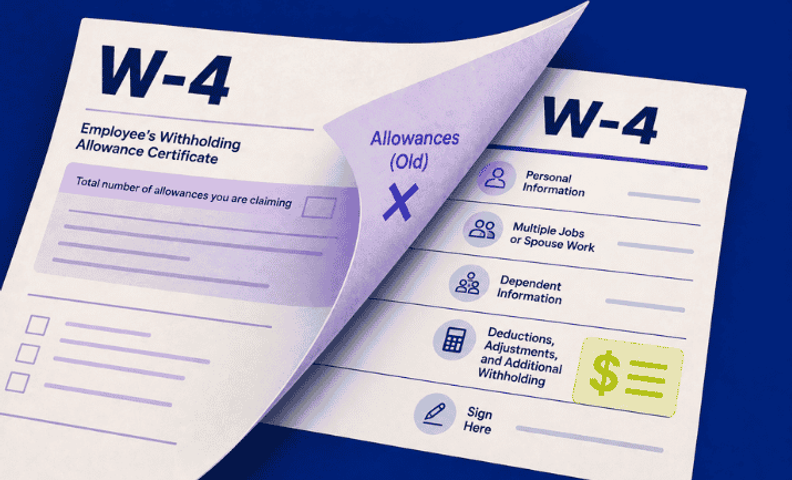
The W-4 form employers use today looks very different from the version most people grew up filling out.
Allowances are gone, additional steps have been added, and employees still sometimes have questions about how it works. Here's an overview of what changed and what you need to know as an employer.
You can also view our video, which has more details on these changes.
2020 W-4 form overview
The form can be downloaded directly from the IRS. The 2020 form is broken down into 5 sections or steps:
- Personal information
- Multiple jobs or spouse work
- Dependent information
- Deductions or withholdings
- Signatures
The biggest change from the old version was moving from a number of allowances to a calculated amount of tax to withhold. Employees who are used to the old allowance method sometimes find this less intuitive, so be prepared for occasional questions.
Key things to note
Here are the key takeaways from the 2020 W-4 form:
- Allowances are gone, calculated withholdings are in.
- Any new employee must complete the current W-4 form when they're hired.
- Existing employees who already have a W-4 on file don't need to fill out a new one, but...
- They will need to use the current W-4 form if they want to change their withholdings.
Why the changes?
The official line from the IRS for the new W-4 is it “reduces the form's complexity and increases the transparency and accuracy of the withholding system.” It has also been noted that this is a response to the 2017 Tax Cuts and Jobs Act. My take is that both points are true, but the calculation of withholdings is more complicated as most people used the number of people they supported in a household as a quick way to determine allowances.
Entering into payroll systems
With the current W-4 form, you'll need to enter the information into your payroll solution of choice. There are a lot of options out there, but here are details for the payroll solutions we work with:
Gusto
Gusto will automatically transfer information from the W-4 if you send it out via Gusto. See this article, Access W-4 forms for employees, for details.
ADP Run
For new employees, use the Add employee wizard under Employees and it will guide you through adding the appropriate information. For existing employees, go to Employees > Tax Info and select Edit under the Federal Tax section. You will have an option to edit using the 2020 W-4 there.
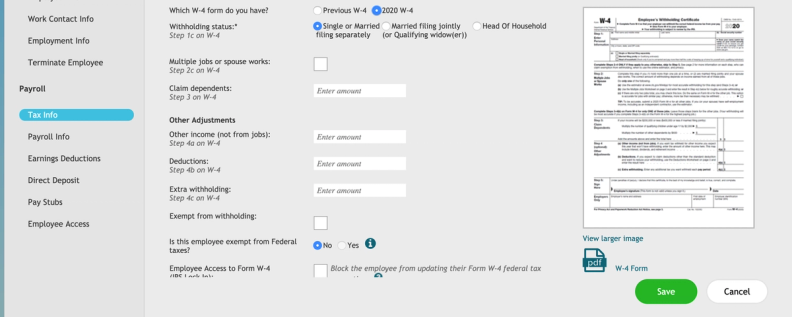
QuickBooks Payroll
There are many Intuit QuickBooks payroll products. This article, What's changing with the Federal W-4?, covers the 2020 W-4 changes. Skip to the bottom for how to enter the new W-4 information into the respective QuickBooks product.
Frequently asked questions
Do existing employees need to fill out a new W-4?
No. Existing employees aren't required to submit a new 2020 W-4, but they will need to use the new form if they want to change their withholdings.
Who is required to use the 2020 W-4 form?
Any new employee must complete the current W-4 form when they're hired.
Why did the IRS redesign the W-4?
The IRS says the change reduces the form's complexity and increases the transparency and accuracy of the withholding system. It's also widely seen as a response to the 2017 Tax Cuts and Jobs Act.
What are the five sections of the new W-4?
Personal information, multiple jobs or spouse work, dependent information, deductions or withholdings, and signatures.
How do I enter the new W-4 information into my payroll system?
It depends on your payroll provider. Gusto automatically transfers the information if the form was sent out through Gusto, ADP Run has an Add Employee wizard for new hires and an edit option under Employees, Tax Info for existing ones, and QuickBooks Payroll has its own entry process depending on the product.
Payroll compliance shouldn’t fall on you alone
Here's what you need to do to get ready.
- Download the current W-4 form.
- Start using it for new employees and changes with existing employees.
- Be ready to support employee questions on how to calculate withholdings (our YouTube video goes into more details that will help you support employee questions).
Getting W-4 details entered correctly into your payroll system is just one piece of keeping your team paid accurately and your books clean. LedgerGurus handles ecommerce accounting and income tax together, so your payroll, withholdings, and filings stay accurate and in sync, not managed as separate headaches.
